

Description
Download Weather Underground for Chrome – Weather App, Forecast, Photography
Overview
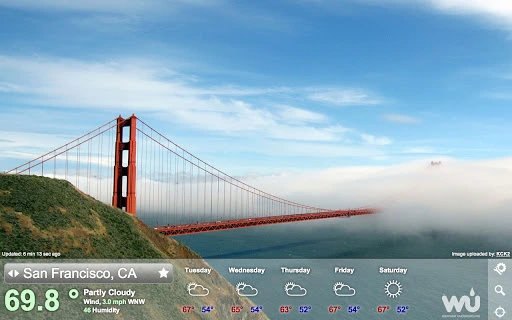
Weather Underground for Chrome delivers a visually immersive experience for monitoring current weather conditions and forecasts across the globe. Designed as a desktop application for Chrome OS and other supported platforms, it leverages real-time weather data to provide users with accurate, up-to-date information. The software integrates high-definition photographs contributed by users worldwide, ensuring that each visual element is contextually relevant to the current weather in a given location. This combination of reliable meteorological data and real-world imagery creates a unique interface that enhances both understanding and engagement with weather patterns.
The tool is ideal for individuals who rely on timely weather updates for daily planning, travel, outdoor activities, or professional work in fields such as logistics, agriculture, or event management. It also appeals to weather enthusiasts and photography lovers who appreciate the curated visual storytelling aspect. The application allows users to save favorite locations and navigate between them using keyboard shortcuts, streamlining access to frequently monitored areas. For more detailed forecasts, users can click the wunderground.com logo to access extended hourly data.
The developer did not provide additional background information. However, the software’s foundation in wunderground.com’s established weather network suggests a strong data source. Real-world usage scenarios include monitoring weather across multiple cities during international travel, tracking storms for safety, or simply enjoying the visual representation of global weather conditions from a desktop environment.
Key Features & Capabilities
- Global Weather Data Integration – Pulls real-time weather conditions and forecasts from a trusted network of meteorological sources, ensuring accuracy and reliability for users worldwide.
- Dynamic Weather Photography – Displays high-definition images contributed by users around the globe, each selected based on the current weather in the specific location, offering a visual context for conditions like rain, snow, or sunshine.
- Favorite Locations Management – Allows users to save and quickly access preferred cities or regions, reducing the need for repeated searches and improving workflow efficiency.
- Keyboard Navigation Shortcuts – Includes intuitive access keys:
Accesskey + sfor search,Accesskey + cfor configuration,Accesskey + lfor geo-location, andESCto close the dialog box. Arrow keys enable seamless cycling through saved favorites. - Link to Detailed Forecasts – A clickable wunderground.com logo provides access to comprehensive, hourly forecasts and additional weather details for any selected location.
These features collectively support efficient weather monitoring, especially for users managing multiple locations. The visual component enhances user engagement and comprehension, making complex weather patterns easier to interpret. For example, a traveler planning a multi-city trip can quickly assess conditions in each destination using the relevant photo and data. Similarly, a professional in outdoor event planning can use the tool to evaluate risks and make informed decisions based on real-time visuals and forecasts.
User Interface, Workflow & Performance
The user interface of Weather Underground for Chrome is clean and focused on visual impact. The main display centers on a high-resolution photograph that corresponds to the current weather in the selected location, with overlayed data such as temperature, humidity, and wind speed. The layout is minimalistic, emphasizing imagery and essential metrics without clutter.
Navigating through the app is intuitive. Users can search for locations, save favorites, and switch between them using keyboard shortcuts. The use of arrow keys to cycle through saved cities enhances speed and reduces reliance on mouse interactions. The interface remains responsive, though exact performance details were not specified. The developer did not provide information about CPU or RAM usage, so actual resource behavior may vary depending on system configuration and network conditions.
Stability appears consistent with typical Chrome-based applications, but no formal testing data was shared. General software behavior patterns suggest smooth operation under normal conditions. The application’s lightweight design, with a file size of 1.2 MB, indicates low storage impact. Users can expect minimal system overhead, though real-world performance may depend on internet connectivity and the frequency of data updates.
Compatibility & System Requirements
Weather Underground for Chrome is compatible with Chrome OS, Windows, Mac, and Linux operating systems, making it accessible across a wide range of desktop environments. The software is designed to run as a Chrome app, leveraging the Chrome browser’s runtime environment. This ensures broad compatibility with modern systems that support Chrome or Chromium-based browsers.
The installation size is listed at 1.2 MB, indicating a lightweight footprint that does not strain storage resources. No specific hardware requirements were provided, so users should rely on general system capabilities typical for running the Chrome browser. The developer did not specify minimum CPU, RAM, or graphics requirements.
Compatibility information was partially provided. Users on older or less common systems may need to verify browser compatibility. For optimal performance, a stable internet connection is recommended due to the app’s reliance on real-time data and image streaming.
Pros and Cons
Pros
- Visually engaging interface with real user-contributed weather photography
- Access to accurate, real-time weather data from a trusted source
- Supports multiple favorite locations for quick access
- Keyboard shortcuts improve navigation efficiency
- Lightweight at only 1.2 MB in size
- Free to download and use
Cons
- No official information on system requirements or resource usage
- Dependent on internet connectivity for data and image loading
- Limited to Chrome-based platforms; not available as a standalone desktop app
- Visuals may vary in quality based on user-submitted content
- Advanced features require external navigation to wunderground.com
FAQ Section
Is Weather Underground for Chrome available for all operating systems?
The software is designed for Chrome OS, Windows, Mac, and Linux, but it runs as a Chrome app, requiring a compatible browser environment. Users should ensure their system supports Chrome or Chromium.
Is the app secure to use?
As a Chrome app, it operates within the browser’s security sandbox. It accesses weather data from wunderground.com, a reputable source. No personal data collection details were provided, but standard browser privacy settings apply.
How often does the app update weather data?
Weather data is updated in real time as long as the app is running and connected to the internet. The frequency depends on the data feed from the source network.
Can I use this app offline?
The app requires an active internet connection to load weather data and images. Offline functionality is not supported.
Is there a license or subscription required?
Weather Underground for Chrome is completely free to download and use. No license or subscription is needed.
Final Thoughts + CTA
Weather Underground for Chrome stands out as a visually compelling and functional tool for anyone seeking reliable weather information with a unique aesthetic. Its integration of real user photography with accurate forecasts creates an engaging experience that goes beyond standard weather widgets. The ability to save favorites and navigate with keyboard shortcuts enhances usability, especially for power users managing multiple locations.
While the app lacks detailed system specifications and is limited to Chrome-based environments, its lightweight design and free access make it a strong choice for desktop users across Windows, Mac, Linux, and Chrome OS. The combination of performance, visuals, and functionality offers a compelling value proposition.
For those who value both accuracy and beauty in weather tracking, this application delivers a refreshing alternative to generic tools. Download Weather Underground for Chrome now.
Guides & Tutorials for Weather Underground App for Chrome
How to install Weather Underground App for Chrome
- Click the Preview / Download button above.
- Once redirected, accept the terms and click Install.
- Wait for the Weather Underground App for Chrome download to finish on your device.
How to use Weather Underground App for Chrome
This software is primarily used for its core features described above. Open the app after installation to explore its capabilities.
User Reviews for Weather Underground App for Chrome 0
No reviews found





